
Custom PC Cable Designer - Now Live
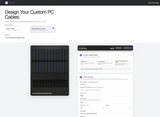
The Ensourced Cable Designer lets you plan custom PC cables before adding them to your order.
For about ten years, I used a Google Sheet to plan cable designs. It did the job, but it was still a spreadsheet. I wanted one place where you could choose the cable, set the design, review the details, and build the full order.
Choose Your Cable
Start by selecting Extension Cables or Modular Replacement Cables, then choose the cable type you need. Extension cables connect to your existing power cables. Modular replacement cables connect directly to a compatible power supply.
Build the Design
You can use one sleeving color across the cable, choose colors wire by wire or by pair, or reference a previous Ensourced design. The live preview updates as you work, so you can see the design before it is added to the order.
The Designer also lets you select cable length, connector color, Wire Wrap color, quantity, crafting period, and design notes. Curve orientation and other cable-specific options appear where they apply.
Keep the Order Together
Add each completed cable to Order Contents, then review the full order before adding it to your cart. If you are not ready to order, you can save the design for later. Saved and cart orders receive a Design ID automatically.
Feedback Is Welcome
This tool is new, and I want it to be useful. If something is unclear, if you run into an issue, or if there is an option you would like to see, please let me know. Your feedback will help me keep improving it.
Open the Ensourced Cable Designer
Questions or feedback? Contact me here. You can also return to Ensourced.net to view custom cable options and completed builds.