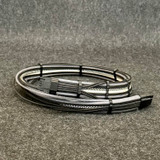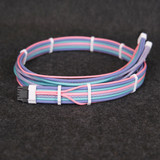


12V-2x6 / 12VHPWR GPU Extension Adapter
$35.00
Starting at $35. Build a custom 12V-2x6 / 12VHPWR GPU extension adapter in the Cable Designer. This extension connects your graphics card to its existing 8-pin PCIe power cables.
Match the two-, three-, or four-input configuration to your graphics card manufacturer’s adapter or power guidance. Use one separate PCIe power cable from the power supply for each 8-pin adapter input, and connect every input.
This is an extension cable. It does not connect directly to a modular PSU port.
Current stock:
Starting at $35. Build a custom 12V-2x6 / 12VHPWR GPU extension adapter in the Cable Designer. This extension connects a 12V-2x6 or 12VHPWR graphics card to its existing 8-pin PCIe power cables.
Before You Design
This is an extension cable. It connects between the graphics card and your existing PCIe power cables. It does not connect directly to a modular PSU port and is not a replacement modular PSU cable.
Use one separate PCIe power cable from the power supply for each 8-pin input on this adapter. Do not use two connectors from the same daisy-chain or pigtail cable. Connect every adapter input and follow the connection guidance supplied with your graphics card and power supply.
How to Order
- Check the adapter supplied with your graphics card, or its power guidance, to determine whether you need two, three, or four 8-pin PCIe inputs.
- Open the Cable Designer and select the extension category.
- Choose the 12V-2x6 / 12VHPWR GPU extension adapter.
- Select the input configuration, cable length, Wire Wraps, sleeving design, and crafting period.
- Add each different cable design to your Order Contents.
- Review the completed order, then select Add Order to Cart in the Cable Designer.
Choosing the Input Configuration
Two-, three-, and four-input versions provide the same GPU-side power capability. Select the configuration that matches the separate PCIe power cables required by your graphics card setup.
Every included 8-pin input must be connected. The additional inputs allow the load to be spread across separate PCIe cables and, where applicable, multiple 12V rails.
Measuring Cable Length
Available lengths are 30–70 cm. Measure from the graphics card’s 12V-2x6 connection to the point where the extension will connect to your existing PCIe power cables. Include cable-routing openings and enough length for smooth bends and final positioning.
Fully seat the 12V-2x6 connector at the graphics card. Avoid sharp bends immediately beside the connector.
Design and Construction
- 16 AWG stranded copper wire
- High-density paracord sleeving
- Wire Wraps installed at approximately one wrap per 10 cm of cable length
- Built by hand for the selected input configuration and cable length
Use the Cable Designer to choose the sleeving design, Wire Wrap color, connector color, and crafting period. You can also view available options on the Sleeving Colors page.
Choose the Correct Cable
This extension adapter: Connects a 12V-2x6 / 12VHPWR graphics card to existing PCIe power cables. It does not connect directly to the power supply.
Need a direct cable from a compatible modular power supply to your graphics card? Choose the 12V-2x6 / 12VHPWR Modular GPU Adapter Cable.
Does your compatible PSU have a native 12V-2x6 connection? Choose the 12V-2x6 / 12VHPWR PCI-e 5.0 Modular Cable.
Frequently Asked Questions
Do I need to connect every 8-pin input?
Yes. Every input included on the selected adapter must be connected to a separate PCIe power cable from the power supply.
Can I use two PCIe connectors from one daisy-chain cable?
No. Use one separate PCIe power cable from the power supply for each adapter input.
Will this fit my power supply?
This extension does not connect directly to the power supply, so it does not require a modular PSU compatibility type. Your power supply must have the required number of separate PCIe power cables for the selected adapter configuration.
Can I use a different input configuration if it supports the same GPU-side power capability?
Choose the configuration that matches your graphics card manufacturer’s adapter or power guidance. Follow the instructions supplied with your graphics card and power supply.
Need Help?
If you are unsure which input configuration or cable length to choose, contact me before ordering.